Command Code is the agentic coding platform from commandcode.ai — a CLI and Studio toolset that wraps Anthropic, OpenAI, Google, MiniMax, DeepSeek and dozens of open-weight models behind one interface. Its pricing model is the most interesting part of the product: flat monthly subscription with a MASSIVE credit multiplier, rolling usage windows, and credits that never expire. This is my honest command code pricing review after reading the full pricing and limits documentation cover to cover.
What Is Command Code?
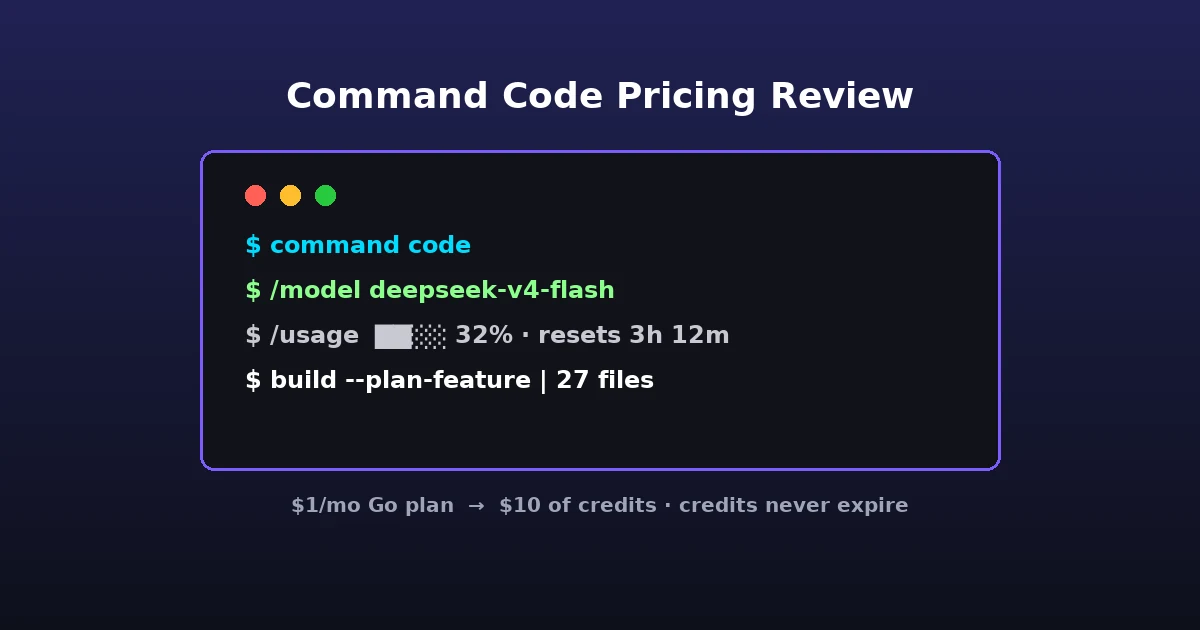
Command Code is an AI coding agent that runs in your terminal (CLI) and in a desktop Studio plus IDE integrations. You bring your own project, Command Code reads your codebase, and lets you plan, write, review and fix code using the model you pick. It is not a chatbot website widget — it is a developer tool aiming to replace the paid tiers of Anthropic and OpenAI coding planes with a subscription that bundles access to many models at once.
The key architectural choice: instead of a fixed monthly model fee, Command Code sells you a credit pool at a steep multiplier. You then spend those credits per token, per model, at the model’s own API rate. This is the same “buy a pool, spend by model” structure as OpenRouter, but wrapped in a flat monthly plan where the credits are heavily subsidized.
Command Code Pricing: The Plans at a Glance
The documentation on the Command Code pricing and limits page lists six individual plans and two team plans. Here is the real table from the doc:
| Plan | Price/mo | Credits/mo | Approx requests | 5-hour limit | Weekly limit |
|---|---|---|---|---|---|
| Go | $1 | $10 | ~9K | $2 | $5 |
| GOAT | $10 | $70 | ~75K | $14 | $35 |
| Pro | $20 | $80 | ~100K | $16 | $40 |
| Provider | $15 | Pay-as-you-go | — | — | — |
| Max 10× | $100 | $150 | ~230K | $45 | $90 |
| Max 20× | $200 | $300 | ~370K | $90 | $180 |
| Team Pro | $40 | ~35K requests | — | $12 | $24 |
| Enterprise | $5,000+ | Custom | Custom | — | — |
How the Credit Multiplier Actually Works
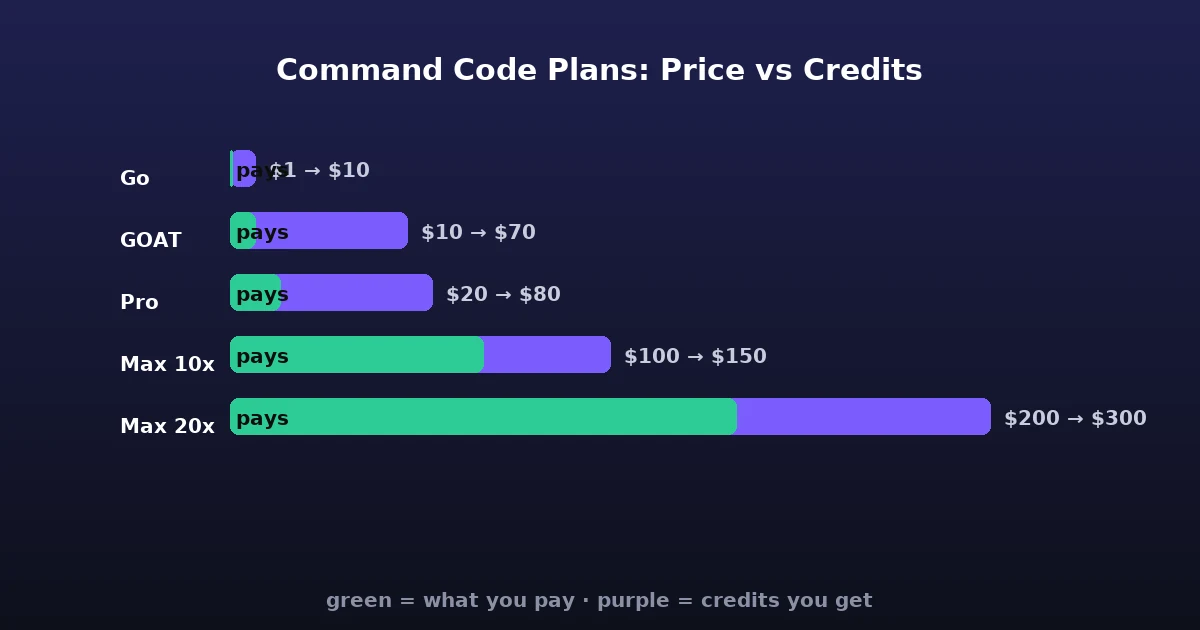
This is the single most surprising thing about command code pricing. On the Go plan you pay $1 and get $10 of credits. On GOAT you pay $10 and get $70. On Pro $20 for $80. Max 10× is $100 for $150, Max 20× $200 for $300. That is a 10× to 1.5× credit bonus depending on tier.
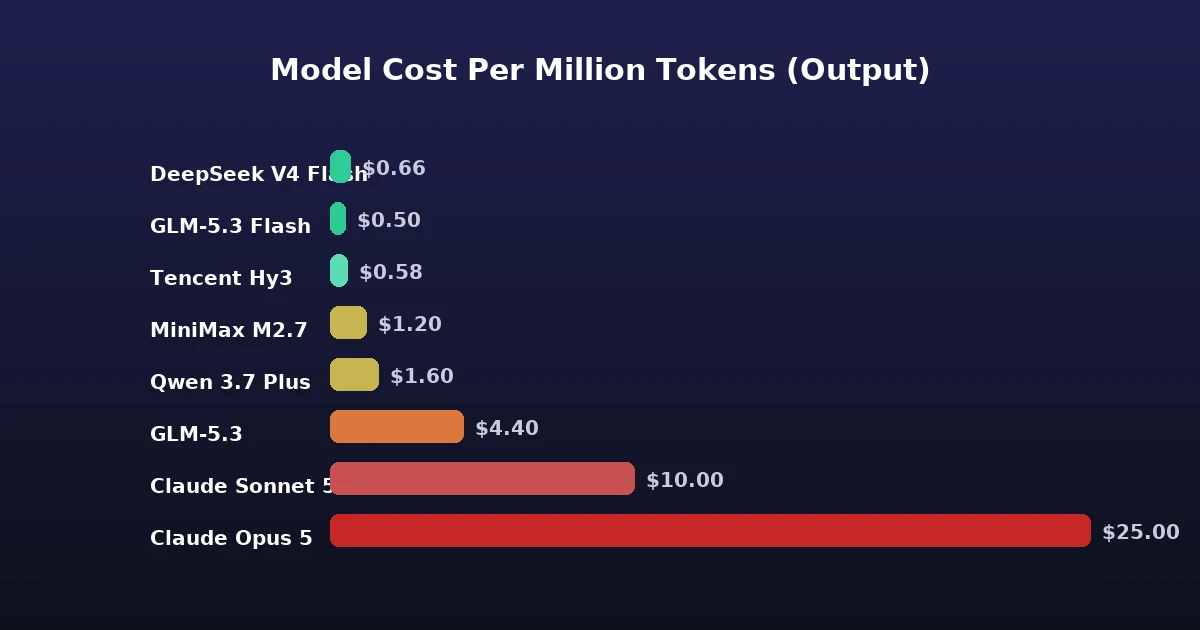
The credits are then spent at the model’s own per-token API rate. A cheap model like DeepSeek V4 Flash at $0.15 input / $0.60 output per million tokens (off-peak) stretches much further than Claude Opus 5 at $5.00 / $25.00. Command Code’s own estimate: on Go, DeepSeek V4 Flash runs about 25,000 requests with no cache, or ~15,000 once the typical 50K of cache reads are counted.
Rolling Usage Windows: The Hidden Constraint
Every subscription plan has two rolling limits on top of the monthly credit pool: a 5-hour window and a weekly window. They are designed to stop a single burst from draining a whole month in one afternoon.
Here is the tradeoff you need to understand before buying: your monthly credits are not immediately spendable all at once. On Go, the 5-hour window caps you at $2 of usage and the weekly window at $5 of your $10 pool. On Max 10× you can spend $45 in 5 hours and $90 a week out of $150. Windows roll from first use, not on a fixed clock, and reset each window-length.
The good news: on-demand top-up credits are exempt from the rolling windows. If you hit a window mid-session you can buy extra credits and keep working immediately, with the window check skipped entirely.
Do Credits Really Never Expire?
Yes — that is stated plainly. Monthly subscription credits reset at the start of each billing cycle, but top-up and on-demand credits roll over forever. They are not throttled, not capped, and you can buy them at model cost. This is genuinely consumer-friendly for a pay-per-usage product and a real differentiator versus many competing plans that expire credits monthly.
Model Pricing: The Depth of the Catalog
Command Code’s catalog is deep. Across all plans the docs list 91 models at the time of writing, with 7 deals and 5 free models. The newest head is Claude Opus 5.5 at $4.00/$20.00 per million tokens — cheaper than Claude Opus 5 — alongside GPT-6 Sol and the budget GPT-6 Luna, and MiMo V2.6 Pro and Flash. Recent additions include Claude Haiku 5.5 at $0.10/$0.50 — a tenth of Haiku 4.5’s rate — and Mistral Large 4 at $1.36/$4.18. Here is what matters for real coding work:
Premium frontier models
| Model | Input/M | Output/M | Cache read/M | Cache write/M |
|---|---|---|---|---|
| Claude Opus 5 | $5.00 | $25.00 | $0.50 | $6.25 |
| Claude Sonnet 5 | $2.00 | $10.00 | $0.20 | $2.50 |
| Claude Haiku 4.5 | $1.00 | $5.00 | $0.10 | $1.25 |
| GPT-5.6 Sol | $5.00 | $30.00 | $0.50 | $6.25 |
| Claude Opus 5.5 (1M ctx) | $4.00 | $20.00 | $0.20 | $5.00 |
| GPT-6 Sol (1.1M ctx) | $2.00 | $10.00 | $0.20 | $2.50 |
Cost-efficient workhorses
| Model | Input/M | Output/M | Cache read/M |
|---|---|---|---|
| DeepSeek V4 Flash (off-peak) | $0.15 | $0.60 | $0.003 |
| DeepSeek V4.1 Flash | $0.15 | $0.60 | $0.003 |
| DeepSeek V4 Pro (off-peak) | $0.66 | $1.98 | $0.022 |
| GLM-5.3 Flash | $0.15 | $0.50 | $0.03 |
| MiniMax M2.7 | $0.30 | $1.20 | $0.06 |
| Qwen 3.7 Plus | $0.40 | $1.60 | $0.08 |
| Tencent Hy3 | $0.14 | $0.58 | $0.035 |
| MiMo V2.6 Flash | $0.14 | $0.28 | $0.0028 |
| MiMo V2.6 Pro | $0.435 | $0.87 | $0.0036 |
| GPT-6 Luna (1.1M ctx) | $0.10 | $0.50 | $0.01 |
What the Premium Tier Actually Buys
The two price tables above are the provider’s own rates. They tell you what each model costs per million tokens — they cannot tell you what you get for it. Artificial Analysis measures the quality side independently, with a composite intelligence index, a coding index, and the observed speed each model emits tokens at. Here are the models this page prices, in the order the scores actually fall.
| Model | Tier on this page | Intelligence index | Coding index | Measured output speed |
|---|---|---|---|---|
| Claude Opus 5.5 (1M) | Premium | 57.6 | — | 97 tok/s |
| Claude Opus 5 | Premium | 50.8 | 78.0 | no measurement published |
| GPT-6 Sol (1.1M) | Premium | 47.6 | — | no measurement published |
| GPT-5.6 Sol | Premium | 47.0 | 77.4 | no measurement published |
| MiMo V2.6 Pro | Workhorse | 46.3 | — | 38 tok/s |
| GLM-5.3 Flash | Workhorse | 41.8 | 71.5 | 55 tok/s |
| DeepSeek V4.1 Flash | Workhorse | 39.5 | — | 215 tok/s |
| Claude Sonnet 5 | Premium | 38.2 | 71.5 | no measurement published |
| GPT-6 Luna (1.1M) | Workhorse | 38.1 | — | 142 tok/s |
| MiMo V2.6 Flash | Workhorse | 37.9 | — | 49 tok/s |
| DeepSeek V4 Pro | Workhorse | 36.0 | 68.8 | 80 tok/s |
| MiniMax M2.7 | Workhorse | 22.8 | 52.6 | no measurement published |
| Claude Haiku 4.5 | Premium | 16.9 | 43.9 | 103 tok/s |
“Premium” is a price label, not a quality label. Two workhorse models outscore two of the premium ones outright: MiMo V2.6 Pro at 46.3 and GLM-5.3 Flash at 41.8 both beat Claude Sonnet 5 at 38.2 and sit far above Claude Haiku 4.5 at 16.9. Pull the rates from the tables above and the gap becomes stark — MiMo V2.6 Pro at $0.435 in and $0.87 out reaches roughly 80% of the top intelligence score on this page, where Claude Opus 5.5 costs $4 in and $20 out for the remaining 20%. If your plan’s credits are the constraint, that is the single most useful number in this review.
The ceiling is real, though. Claude Opus 5.5 is the only model on this page above 51, and it holds a nine-point lead over the best workhorse row. Nothing cheaper gets close to it, which is exactly why the premium tier survives at its rate: if the task lives or dies on the hardest 10% of prompts, the workhorse table will not get you there. Paying for it and using it on routine edits is where credits disappear.
Check what you are buying on the cheap side of the premium tier. Claude Haiku 4.5 is the lowest-scoring model on the entire page at 16.9 — below every workhorse row listed here, including MiniMax M2.7 — while still carrying the premium price of $1 in and $5 out. Whatever reason you have for choosing it (a long context, an Anthropic-specific workflow, familiarity), it is worth knowing which genuinely stronger workhorse row you are giving up to get it.
Speed is where the cheap lanes win outright. DeepSeek V4.1 Flash emits 215 tok/s, more than twice the fastest premium row on this page (Claude Opus 5.5 at 97), at about a tenth of the rate. In an editor, where you re-run the same small prompt dozens of times an hour, throughput is felt far more than the last few index points — which is the argument for keeping a cheap fast lane as your default and spending credits on the premium models only when a task has already gone wrong once.
Intelligence, coding and speed figures: Artificial Analysis, retrieved 10 October 2026. Prices are this provider’s own rates, from the tables above. The same index is used in our OpenCode Go review, OpenRouter review and Google AI Studio free tier review, so scores are comparable across providers. Tiers reflect how this provider groups the models, not the measurement.
Free Models in 2026: Real Zero-Cost Coding
At the time of writing, Command Code had five free models — some permanently, some time-bound. (LongCat 2.0, free when this review was first written, has since moved to a standard per-token rate, and the Space Bunny Alpha stealth preview has left the catalog altogether — a good reminder that this roster rotates.)
- Glyph Cluster — free while the stealth preview lasts, up to 100 requests a day (256K context, input/output/cache all $0.00). It is a stealth model: an anonymous third-party provider runs it, may keep prompts and outputs and may train on them, and offers no zero-data-retention guarantee — so it is deliberately excluded when you run with
CMD_ZDR=1. - Ling 3.1 Flash — free while it lasts, with no daily request limit (262K context, input/output/cache all $0.00). It is inclusionAI’s hybrid reasoning model, aimed at coding and multi-step work.
- Laguna S 2.1 — free while capacity lasts, available on all plans (input, output and cache reads all $0.00).
- Ling 3.0 Flash — free while capacity lasts (256K context).
- Ling 3.0 Flash Sante — free while it lasts, up to 100 requests a day (262K context, health-and-medicine tuned).
One caveat worth knowing before you rely on the free lanes: the free variants are served by third-party hosts (e.g. Novita for Ling 3.0 Flash Sante, which carries a 100-requests-per-day cap) that offer neither zero-data-retention nor a no-training guarantee, and Glyph Cluster is served by an anonymous stealth provider that may keep prompts and outputs. If you run with CMD_ZDR=1 to force zero retention, you cannot use those free lanes at all. The free models are limited-capacity offers, so treat them as a nice bonus, not a dependable base.
Active Deals That Change the Math
The docs flag seven deals live at the time of writing that can stretch your credits dramatically:
- mistral-large-4 boosted credits — $10 of usage on Go (up from about $6), $40 on GOAT (up from about $20) and $50 on Pro (up from about $30), through October 20, 2026.
- glm-5.3-flash boosted credits — $10 on Go, $60 on GOAT and $70 on Pro, while capacity lasts.
- minimax-m3 at 2× usage — every credit goes twice as far.
- mimo-v2.5 and mimo-v2.5-pro up to 99% off.
- glyph-cluster:free, laguna-s-2.1-free, ling-3.0-flash-sante:free and ling-3.1-flash-free are free — requests on those four lanes cost no credits at all and do not draw down your usage windows (see the free-model caveats above).
- deepseek-v4.1-flash boosted credits, now with no end date — $10 of this model on Go, $60 on GOAT and $70 on Pro. The doc has made the boost permanent and it applies automatically.
Deals stack with your plan’s credit bonus. On GOAT and Pro the deals are baked into per-model allowances automatically, with nothing to enable. On top-up credits the same discount applies when spent on the discounted model. The real-time Usage page shows the discounted per-request price as it happens, and deals auto-expire with no action needed.
Enterprise and Security
For organizations, Command Code offers an Enterprise tier from $5,000+/mo with custom model pools, SLAs and dedicated support on your own infrastructure. The documented security posture is strong for a coding agent: Command Code does not train on your code and does not store your code snippets unless you choose to share them. Taste data (your personalization) is stored locally in your project directory. Commercial model traffic is sent to the provider’s API (Anthropic, OpenAI, Google, Azure) and handled per their privacy policy, with EU hosting on demand. There is a Zero Data Retention mode available, subject to the free-lane caveat above.
How Command Code Compares to Other Providers
If you already use OpenRouter or Google AI Studio’s free tier, Command Code is a different category. OpenRouter is a pure API gateway: you pay per token with no subscription bonus. Google AI Studio gives you a limited free tier. Command Code bundles a subscription plus access to both open-weight and premium models, with the credit multiplier as the main incentive. The closest analogues are the paid coding plans of Anthropic and OpenAI, but Command Code’s advantage is model choice and the never-expiring top-up credits.
For a website owner or chatbot operator rather than a developer, Command Code is not the tool for adding a chatbot to WordPress — that is a code-heavy workflow. But if you are building, deploying or maintaining that chatbot’s backend, plugins, or n8n workflows, a cheap Go plan gives you a serious coding agent for a dollar a month.
Who Should Buy Which Command Code Plan
- Go ($1/mo, $10 credits) — hobbyists, light script editors, first try. Enough for dozens of small tasks and a real test of the workflow.
- GOAT ($10/mo, $70 credits) — the best value if your work is mixed open-weight coding. ~75K requests.
- Pro ($20/mo, $80 credits) — heavy users who want premium models like Sonnet 5 and GPT-5.6 in the mix. ~100K requests.
- Max 10×/20× ($100/$200) — professional teams hammering code all day; the credit multiplier is weakest here (1.5×) but the pool is biggest and windows are generous.
- Provider API ($15) — pay-as-you-go raw API access, no subscription, for integration into your own apps.
Limitations and Honest Caveats
- Rolling windows are real throttles on included credits. Your 10× credit bonus is not instantly spendable — on Pro you cap at $16 per 5 hours. Plan around bursts.
- Free models are capacity-limited or time-bound. Laguna S 2.1, Ling 3.0 Flash and Ling 3.0 Flash Sante are all “while they last” or daily/request-capped offers.
- No zero-retention on the free lanes. The free models are served by third-party hosts with no ZDR/no-training guarantee.
- A developer tool, not a chatbot provider. If you want to embed a chat widget on your site, this is not that. It is for writing code.
- Request estimates vary wildly. 9K vs 25K vs 370K depends entirely on model choice and cache usage. The “typical request” includes ~42-56K cache reads that burn credits on every turn.
A Worked Example: What One Session Costs
To make the numbers concrete, let me run a realistic session through the pricing. Command Code states a typical request is about 700-1,000 input tokens, 125-200 output tokens, plus roughly 42,000-56,000 cache reads on average. The cache reads are the quiet cost driver: every new turn in a conversation re-reads the full context, so a long-running session is far more expensive than a fresh one.
Take three models doing the same 50-request feature build:
| Model | Input cost | Output cost | Cache cost | ~50 requests |
|---|---|---|---|---|
| DeepSeek V4 Flash | $0.15/M | $0.60/M | $0.003/M | ~$0.65 |
| Claude Sonnet 5 | $2.00/M | $10.00/M | $0.20/M | ~$11 |
| Claude Opus 5 | $5.00/M | $25.00/M | $0.50/M | ~$27 |
The gap is enormous: the same build costs roughly 40× more on Opus than on DeepSeek Flash. That is why Command Code’s “how far your credits go” is genuinely model-dependent, and why the docs repeatedly steer you toward cheaper models when you want many requests rather than maximum quality. It also means the monthly-request estimates (9K on Go, 75K on GOAT, 100K on Pro) are useful only if you favor efficient models. Pick ambitious premium models all day and you will burn the pool far faster.
A practical tip from the docs: start a new session (or use /clear) for unrelated tasks, because every new turn re-reads the full context in cache. Keeping conversations short is the single biggest lever on cost.
How Command Code Stacks Up Against Other Providers
Because I review AI providers for yakwp.com, I have tested several of the alternatives Command Code competes with, and the differences matter depending on what you are building.
Command Code vs OpenRouter
OpenRouter is a pure API gateway: you bring your own key and pay per token with no monthly subscription, no credit multiplier, and no free-tier coding models of its own. If you want direct API access to many models for your own application — such as the plumbing behind a WordPress chatbot — OpenRouter is the more direct choice. Command Code instead gives you a subsidized flat plan, which wins when you want a lot of coding done for one predictable monthly price. My OpenRouter review covers that tradeoff in depth.
Command Code vs OpenCode Go
OpenCode Go is the closest direct competitor: an agentic coding CLI with bundled model access at a low flat price. Both use a subscription-plus-many-models model. Command Code’s pricing documentation is unusually transparent (public per-token rates for all 91 models, real-time usage meters, rolling windows), which is a point in its favor for cost-sensitive developers. See my OpenCode Go review for the alternative.
Command Code vs Google AI Studio
Google AI Studio’s free tier is the standing reference point for zero-cost AI: a generous daily free allowance on Gemini models. It is free but limited to Google’s models. Command Code bundles a much wider catalog (Anthropic, OpenAI, DeepSeek, Qwen, MiniMax and more) behind a paid subscription, with only a few free models. If you want Google models for free, Google AI Studio’s free tier is still the unbeatable option; if you want a broad multi-model coding agent, Command Code wins.
All three reviews live in our AI providers cluster, so you can compare the whole field.
Who This Is For (and Who It Is Not For)
Command Code is squarely a developer tool. It makes sense for developers, technical founders, and automation builders who write, review and maintain code every day.
It is not the tool for adding a chatbot to your website, embedding a support widget, or sending visitors an AI assistant. For those, a WordPress chatbot plugin with its own model integration is the right starting point — and I recommend seeing how to add an AI chatbot to WordPress and our best free chatbot roundup. But if you are building the backend, plugins, or n8n automation behind that chatbot, a $1 Go plan gives you a serious coding agent to do it.
Command Code Pricing: Final Verdict
Putting the whole model together, here is how I rate Command Code across the dimensions that matter:
| Dimension | Rating | Notes |
|---|---|---|
| Value / dollar | Excellent | $1 → $10 of credits; ~10× multiplier on low tiers |
| Price transparency | Excellent | All 91 model rates public; real-time usage meter |
| Flexibility | Excellent | 91 models, BYO providers, switch with /model |
| Credit longevity | Excellent | Top-up credits never expire |
| Burst friendliness | Fair | Rolling 5-hour / weekly windows on included credits |
| Free tier | Good | 5 free models, but capacity-limited / time-bound |
| Audience fit | Narrow | Developers only; not a chatbot-widget provider |
Frequently Asked Questions
Is Command Code actually free?
Do Command Code credits expire?
Which Command Code plan is best value?
What models does Command Code support?
Is Command Code safe to use with my code?
Conclusion
Command code pricing is cleverly designed: a flat subscription with a big credit multiplier, model-level per-token spend, and never-expiring top-ups. The value is real on the low tiers — a dollar for $10 of credits is a genuinely good deal for light coding. The rolling windows keep that generosity honest, and the free model selection makes it easy to try with zero risk. The main thing to remember is that this is a coding agent, so it serves yakwp’s audience best as a backend tool for building the automations, plugins and n8n workflows behind a WordPress chatbot, not as the chatbot itself.
If you need a solid, cheap alternative to expensive Anthropic or OpenAI coding plans — or you want access to dozens of models behind one subscription — Command Code is worth a serious look. Start on the $1 Go plan, test the free Laguna S 2.1 model, and upgrade only when the usage windows start to bite.
Leave a Reply