Yak Event Hooks is a free WordPress webhook plugin. It fires a webhook the moment something happens on your site — a post is published, a comment is added, media is uploaded, or a new user registers — and sends a clean JSON payload to any URL you choose. No API keys. No third-party accounts. Just paste a webhook URL and tick the events you want.
What does a WordPress webhook plugin do?
A webhook is a simple HTTP call your site makes when a chosen event happens. Instead of manually copying data from WordPress into your other tools, Yak Event Hooks does it for you the moment the event occurs. Each event carries a structured JSON payload, so the receiver knows exactly what changed, when, and by whom.
This is the missing link between WordPress and automation tools like n8n, Zapier and Make. You are no longer polling for changes or copy-pasting between dashboards — your workflow starts itself.
What events does it fire on?
- Posts — published, updated, trashed, permanently deleted. Ideal for firing a webhook when a post is published so your social, email or AI pipeline starts automatically.
- Comments — added, status changed (approved, spam, unapproved), deleted. Forward moderation to Slack, ticketing or an AI-reply flow.
- Media — every file uploaded, with dimensions, file size and URL. Perfect for image or asset pipelines.
- Users — every new registered user, with username, email and role. Sync signups to your CRM automatically.
Works with n8n, Zapier and Make
Because Yak Event Hooks sends plain JSON over a standard POST, it works with any endpoint that accepts JSON — n8n, Zapier, Make, IFTTT, webhooks.dev, or your own server. No adapters, no per-service connectors, no lock-in. It is the simplest way to connect WordPress events to the rest of your stack.
Connect Yak Event Hooks to n8n in 4 steps
You can be sending WordPress events into an n8n workflow in under a minute:
- In n8n, add a Webhook node to your workflow, set its method to POST, and enable it. n8n shows you the webhook URL to call.
- Copy that URL.
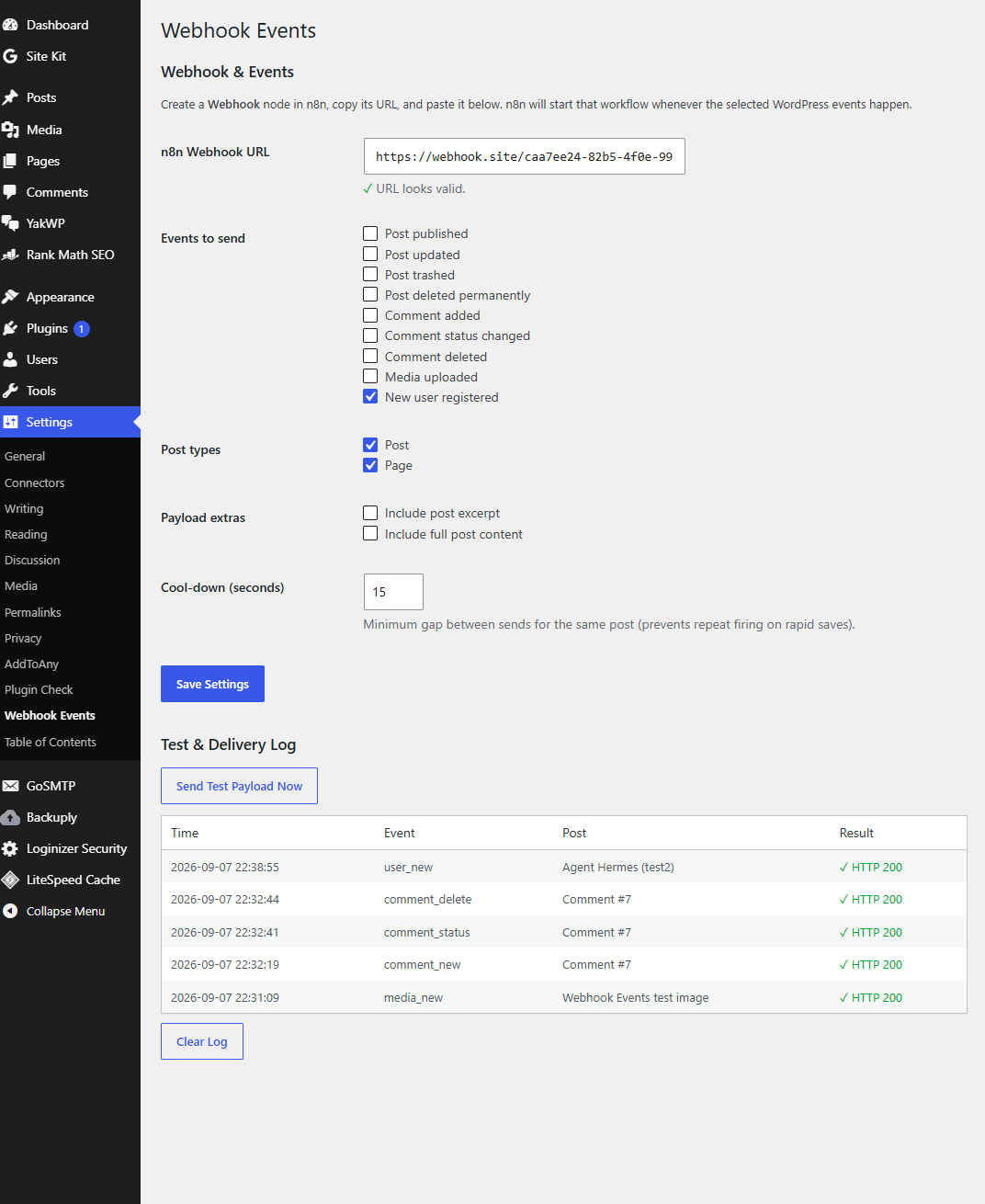
- Open Settings → Yak Event Hooks on your site, paste the URL into the n8n Webhook URL field, and tick the events you want to send.
- Click Send Test Payload Now to confirm the connection, then save.
From here on, every selected event posts its payload to that webhook, and your n8n workflow runs — for example, publishing a post to social, emailing subscribers, or kicking off an AI post-processor.
Setup in under a minute
- Install and activate the plugin.
- Copy the webhook URL from your automation tool.
- Paste it into Settings → Yak Event Hooks and tick the events you want.
- Use Send Test Payload Now to confirm, then save.
Example payload (post published)
{
  "event": "publish",
  "post_id": 42,
  "title": "How to automate WordPress",
  "slug": "automate-wordpress",
  "url": "https://example.com/automate-wordpress",
  "post_type": "post",
  "status": "publish",
  "author": "Oliver",
  "timestamp": "2026-09-05 12:00:00"
}
Comment, media and user events carry the same structure — the event field tells your workflow what happened, and the rest is the curated data that workflow needs.
Lightweight and private by design
Each event is a single HTTP request. There are no database tables, no scheduled tasks and no external services. The only data that ever leaves your site is the JSON payload you asked to send to your own webhook URL — nothing else is tracked or shared.
Frequently asked questions
Do I need an API key or account?
No. You only need the webhook URL of your own endpoint. The plugin works with n8n, Zapier, Make, IFTTT and any other service that accepts a JSON POST.
Is it really free?
Yes. Yak Event Hooks is completely free, with every event type included and no limits. We publish it because WordPress automation should be accessible to everyone.
Does it work only with n8n?
No. It sends to any endpoint that accepts a JSON POST, so it fits whatever automation stack you already use.
Which events are supported?
Post published, updated, trashed and permanently deleted; comment added, status changed and deleted; media (attachment) uploaded; and new user registered. Every event can be toggled on or off.
What does a comment event payload look like?
It includes the event type, comment ID, the comment author’s name and email, the comment content, the post it belongs to, and a timestamp — everything a moderation or AI-reply workflow needs.
Does it slow down my site?
No. Each event is a single HTTP request with no database tables, scheduled tasks or external services, so it has no meaningful impact on performance.
Made by the YakWP team. Pair Yak Event Hooks with the YakWP AI chatbot for WordPress, so your site not only sends events everywhere but also talks to every visitor automatically. Get YakWP Free.